
A Deep Dive into the Engineering of Authentic Graphite Portraiture in the Age of Generative AI
By Daramola Paul Imoleayo — Lightson Design Lab
There is a quiet war happening in the world of digital art. On one side, you have the blistering speed of generative AI, capable of producing images in seconds that would take a human artist days or weeks to complete. On the other side, you have the centuries-old discipline of traditional graphite drawing—a medium defined by patience, pressure, and the physical interaction between lead and paper.
And right in the middle, you have thousands of creators—artists, designers, illustrators, and enthusiasts—who are deeply frustrated by the gap between the two.
If you have ever typed the words "pencil sketch" or "graphite portrait" into an AI image generator, only to receive a flat, grayscale version of your photograph that looks like it was processed through a cheap mobile app, you are not alone. This frustration is not a coincidence. It is not a limitation of the hardware or the neural network architecture. It is a fundamental flaw in how most AI models are prompted, and more importantly, how they are trained to perceive drawing.
Today, I want to do something that is rarely done in the AI art community. I want to break down the anatomy of a traditional graphite portrait, explain why standard AI filters fail so spectacularly at replicating it, and introduce a completely different approach—an approach called the Portrait Rendering System, or PRS—that actually forces AI to simulate a human workflow rather than applying a lazy digital overlay.
Part 1: The Misunderstanding of Medium
To understand why AI fails at graphite drawing, we have to look at how most AI image generators are actually designed to function. Large-scale generative models like DALL-E 3, Midjourney, and Stable Diffusion are trained on hundreds of millions of images from the internet. They learn to associate words with visual patterns. When you type "pencil sketch," the model searches its database for images that have been tagged with that phrase, and it attempts to generate a variation of what it has seen.
The problem is that the internet is flooded with low-quality digital sketches, smartphone app filters, and poorly rendered grayscale images. The AI does not understand that graphite drawing is a structural, architectural, and cumulative process. It only understands that a "sketch" is generally gray, slightly noisy, and rough around the edges.
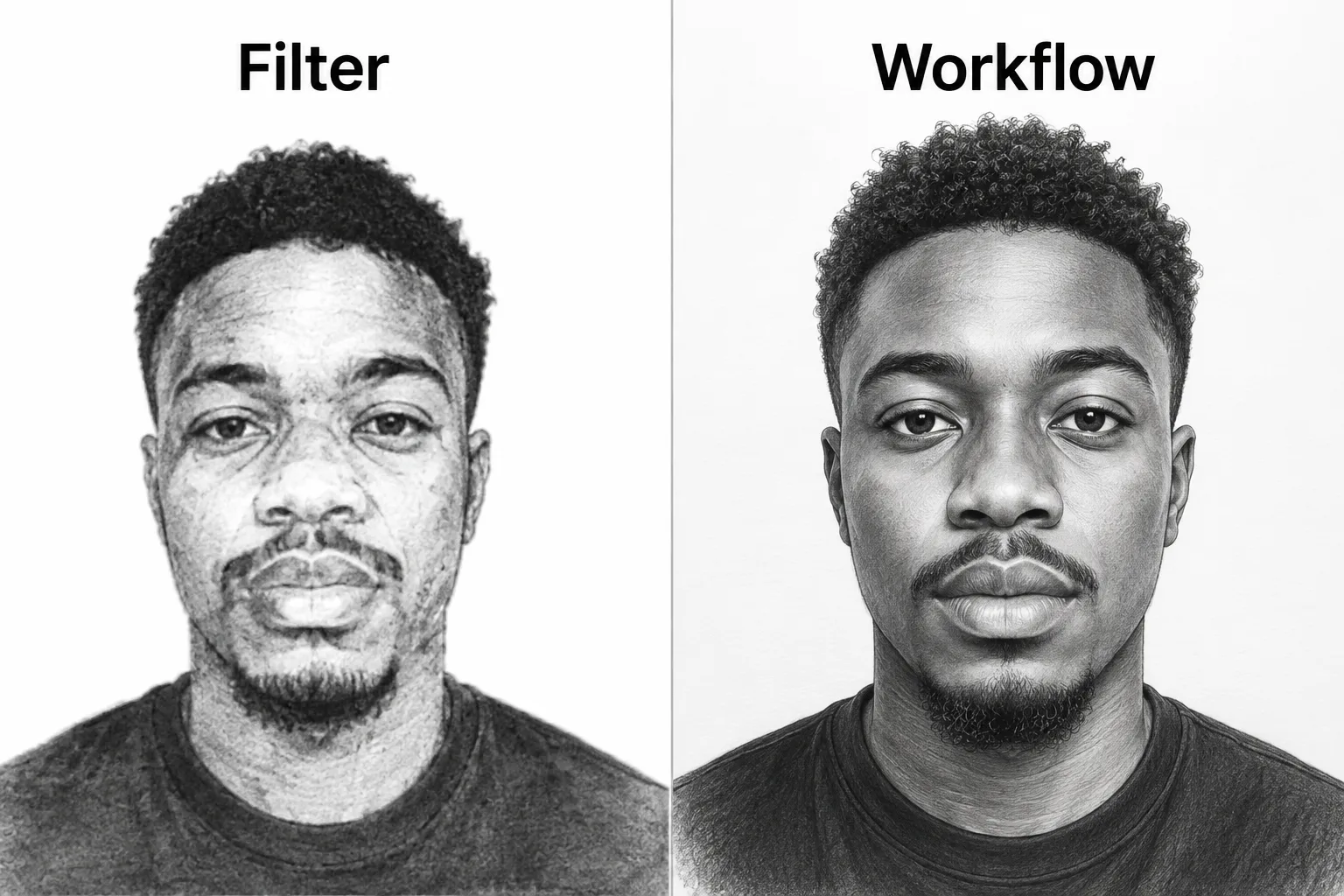
As a result, when you ask the AI for a graphite portrait, it does not try to build the face from the bone structure outward. It simply takes your photograph, desaturates the colors, adds a grainy texture overlay, and flattens the entire image into a uniform gray palette.
"Most AI models are trained to imitate the look of art, not the process of making it. And in traditional portraiture, the process is everything."
This is why the output feels so disappointing. It lacks depth, it lacks structure, and it lacks the physical evidence of a hand holding a pencil. It does not look like a drawing. It looks like a photograph that has been aggressively filtered through a digital effect. And the reason it looks that way is because, fundamentally, that is exactly what it is.
Part 2: The Anatomy of a Traditional Graphite Portrait
To fix a broken system, we must first understand what a functional system looks like. Traditional graphite portraiture is one of the most disciplined and methodical art forms in existence. It is not a spontaneous act of expression. It is a highly controlled, multi-stage construction process that requires technical precision, deep anatomical knowledge, and a profound understanding of light and form.
Every master graphite portrait artist, from the Renaissance to the modern era, follows a specific architectural sequence. The drawing is not built in a single stroke. It is built layer by layer, stage by stage, across a period of hours or even days.
Stage 1: The Architectural Blueprint (HB Graphite)
Every great portrait begins with a light, almost invisible layer of HB graphite. This is not about shading or texture. This is purely about proportion and structure. The artist measures the distance between the eyes, the width of the nose, the curvature of the jawline, and the placement of the ears. They draw faint construction lines that map the skull and the underlying bone structure. These lines are not meant to be seen in the final piece. They are the architectural blueprint—the foundation upon which every subsequent layer will rest. If this stage is done incorrectly, the entire drawing will be distorted, regardless of how beautiful the shading is later.
Most AI filters completely skip this stage. They do not understand the geometry of the human skull. They do not know that the eyes are spaced roughly one eye-width apart, or that the bottom of the nose aligns with the bottom of the earlobe. They simply overlay a flat gray texture onto a photograph. And that is why the result often looks "uncanny"—slightly distorted, slightly unnatural, lacking the structural integrity of a real human face.
Stage 2: Establishing the Value Masses (2B Graphite)
Once the structural foundation is laid, the artist picks up a 2B pencil and begins blocking in the large value masses. This is a crucial stage because it is entirely about recognizing light and shadow on a macro scale. The artist looks at the whole head and asks: where are the darkest regions of the face? Where is the ambient light hitting the skin? They lay down broad, loose strokes to establish the tonal foundation of the portrait. The forehead, the cheeks, the shadow under the chin—these are defined as solid shapes of graphite. This is not about detail. It is about mass. The artist is building the terrain of the face.
AI filters do not understand mass. They analyze a photograph pixel by pixel, but they do not understand that the shadow beneath the jawline is a continuous geometric plane. They treat every shadow as a distinct, isolated pixel cluster, which results in a patchy, uneven appearance that lacks the cohesive flow of a hand-drawn shadow.
Stage 3: Layering and Gradual Depth (4B and 6B Graphite)
This is where the true magic of graphite drawing begins. The artist does not jump directly to the darkest shadows. Instead, they progress through increasingly softer graphite grades: 4B, then 6B. They apply layer after layer of graphite, slowly building up the darkness of the shadows. Every shadow is constructed gradually, over multiple passes of the pencil. This is what gives graphite drawing its richness, its depth, and its undeniable sense of three-dimensionality.
The visible evidence of layered graphite is one of the hallmarks of a master drawing. You can actually see the direction of the strokes, the way the pencil marks overlap, and the gradual transition from light gray to deep black. This is not something a digital filter can replicate, because a filter operates on a single pass—it applies a single formula to the entire image in one go.
Stage 4: Blending and Refinement (Tissue Paper and Blending Stumps)
After the graphite is layered, the artist must blend the broad tonal areas. They use folded tissue paper to smooth out the skin, gently rubbing the graphite into the paper fibers to create a soft, velvety transition. For the refined edges—the eyelids, the tear ducts, the bridge of the nose—they use a blending stump, a tightly rolled piece of paper that allows them to blend only the smallest, most delicate areas.
This stage is critical because it bridges the gap between the rough, scratchy pencil strokes and the smooth appearance of human skin. However, the artist must be careful not to over-blend. Over-blending results in an "airbrushed" look, which is exactly what many AI filters produce—an unnervingly smooth, plastic-like surface that feels digital rather than organic.
Stage 5: Reclaiming the Light (The Kneaded Eraser)
Perhaps the most elegant step in the entire graphite process is the use of a kneaded eraser. Unlike a traditional rubber eraser, a kneaded eraser does not rub the graphite away—it *lifts* it off the paper. By gently pressing the eraser onto the surface of the drawing, the artist can reclaim the pure white of the Bristol board beneath. This is how they create the highlights in the eyes, the shine on the nose, and the reflection of light on the forehead.
It is crucial to understand that the artist does not *paint* white highlights onto the drawing. They *reveal* them by lifting the graphite. This is a subtractive process, not an additive one. And it is precisely this subtle distinction that AI filters fail to grasp. When an AI tries to add highlights to a filtered sketch, it usually just brightens the pixels, resulting in a washed-out, overexposed look that lacks the crisp, sharp quality of a truly lifted highlight.
Stage 6: Restrained Refinement (The Finishing Touch)
The final stage of a traditional graphite portrait is restrained refinement. The artist steps back, looks at the drawing as a whole, and makes subtle adjustments. They darken the deepest accents—the pupils, the nostrils, the deep shadow beneath the chin. They sharpen the edges of the hair and the eyebrows. They re-establish the crisp silhouette against the white background.
This stage is governed by one rule above all others: do not overwork the drawing. A finished graphite portrait should still show the evidence of the hand. There should be slight variations in texture, visible pencil strokes, and a feeling of traditional craftsmanship. It should not look like a digital painting. It should not look like a photograph. It should look like a drawing that was made by a human being, with patience and skill.
The Core Difference: Filter vs. Workflow
- Applies a single-pass grayscale overlay
- Ignores anatomical structure
- No layered graphite texture
- Artificial "airbrushed" appearance
- Digital noise replaces actual texture
- Builds from structural guidelines
- Progresses through HB, 2B, 4B, 6B layers
- Uses tissue and stump blending
- Lifts highlights with kneaded eraser
- Re-establishes crisp details at the end
Part 3: The Portrait Rendering System (PRS) — Engineering the Workflow
This brings us to the core of what we are building at Lightson Design Lab. We believe that AI should not just imitate the *look* of art. It should imitate the *process* of making art. And that is exactly why we developed the Portrait Rendering System, or PRS.
PRS is a stage-by-stage prompt architecture designed specifically for generative AI models like ChatGPT (DALL-E 3) and Midjourney v6.1. Instead of giving the AI a vague instruction like "draw a pencil sketch," PRS breaks the entire drawing process down into eight distinct engines. Each engine is a highly specific instruction that tells the AI exactly what to do at each stage of the creative process.
Engine 01: Reference Preparation
Before the AI begins drawing, it must first prepare a clean, studio-quality reference image. This engine instructs the AI to preserve the subject's exact facial structure, bone structure, proportions, age, gender presentation, ethnicity, and expression. It removes distracting background elements and replaces them with a seamless pure white studio backdrop. The AI is strictly commanded not to beautify or reshape the face. This ensures that the subject is preserved with absolute fidelity before any artistic process begins.
Engine 02: Identity Lock
Perhaps the most critical engine in the entire system. The Identity Lock freezes the subject's identity before any rendering begins. The AI is commanded that throughout every subsequent stage, it must never alter facial proportions, bone structure, eye spacing, nose shape, lips, hairstyle, age, ethnicity, or clothing. Only the artistic medium is allowed to change. The identity must remain constant from the beginning to the end. This is the engine that prevents the "AI beauty filter" effect that often alters a subject's face to make it look more symmetrical or generic.
Engine 03: Graphite Construction
This is the core engine of PRS. It simulates the complete physical workflow of a master graphite artist. The AI is instructed to construct the portrait using light HB guidelines, block in large value masses with 2B graphite, develop form through multiple layers (HB, 2B, 4B, 6B), blend broad facial areas with tissue paper, use a blending stump only for refined transitions, re-establish crisp details with sharpened graphite, reserve soft charcoal only for the deepest accents, and recover highlights using a kneaded eraser.
Each of these nine sub-stages is explicitly commanded in the prompt. The AI is told that it must never jump directly to maximum darkness. Every shadow must appear to have been built gradually through repeated graphite application. The result is a drawing that visibly communicates traditional craftsmanship.
Engine 04: Facial Detail
This engine focuses on the micro-details of the face. The AI is commanded to render crisp pupils, natural iris texture, sharp catchlights, individual eyelashes, and layered eyebrows. The skin is rendered using broad graphite values rather than photographic texture. The AI is explicitly forbidden from creating camera reflections, photographic pores, plastic skin, or artificial smoothing. This ensures that the face feels like a drawing, not a photograph.
Engine 05: Hair & Clothing
This engine focuses on the rendering of hair and garments. The AI is instructed to render all visible hair using thousands of short, directional graphite strokes. Facial hair is built gradually with layered pencil strokes. Clothing is rendered with broad graphite masses and described through tonal variation rather than digital texture.
Engine 06: Museum Finish
This is the final creative stage. The AI is commanded to complete the artwork as though it has just left the drawing board of a professional graphite artist. The finished portrait must visibly communicate layered graphite application, tissue blending, blending stump refinement, controlled pencil direction, kneaded eraser highlights, and restrained charcoal accents. The AI is forbidden from imitating a grayscale photograph, a digital painting, or an AI sketch filter.
Engine 07: Universal Negative Prompt
This is a comprehensive exclusion list. The AI is commanded not to generate anything that resembles a photograph, grayscale photo, pencil filter, sketch filter, digital painting, CGI, 3D render, watercolor, oil painting, anime, or any other non-graphite medium. It also forbids photographic pores, plastic skin, artificial sharpening, and altered identity.
Engine 08: Quality Verification
Before the final artwork is produced, the AI must verify that the subject is immediately recognizable, that the artwork demonstrates layered graphite construction, that tissue blending is evident, that highlights are created through eraser lifting, and that the final image reads as a genuine handmade graphite portrait.
Part 4: The Result
When PRS is executed correctly through ChatGPT (DALL-E 3), the result is nothing short of extraordinary. You do not get a filtered photograph. You get an authentic, hand-rendered graphite portrait that looks like it just came off a master's drawing board. The graphite layers are visible. The tissue blending is visible. The erased highlights are crisp and natural. The subject's identity is preserved with absolute fidelity.
This is not because AI is becoming smarter. It is because the instructions we are feeding the AI are becoming more sophisticated. By shifting from a "result-based" instruction to a "process-based" instruction, we are fundamentally changing the way the machine thinks about art. We are not asking it to imitate. We are asking it to construct.
Part 5: Why This Matters
This matters because the world of digital art is at a crossroads. Generative AI is becoming more powerful, more accessible, and more deeply integrated into the creative workflows of artists, designers, and studios around the world. But if we do not demand more from these tools, we risk settling for a world where "art" is defined by filters rather than by craft.
At Lightson Design Lab, we believe that AI should empower artists, not replace them. We believe that the best way to use generative AI is to encode the wisdom of traditional craftsmanship into the prompts themselves. By teaching the machine to simulate the workflow of a human artist, we are preserving the integrity of the medium while embracing the speed of the modern era.
"By shifting from a result-based instruction to a process-based instruction, we are fundamentally changing the way the machine thinks about art. We are not asking it to imitate. We are asking it to construct."
Download the Free 35-Page PRS Toolkit
Get the complete, unabridged stage-by-stage prompt system. Learn exactly how to build authentic graphite portraits with ChatGPT and Midjourney.
Get Your Free PDF
Comments
No comments yet. Start the conversation.